In Stage 3c-1, Waystone learned to write a server's settings and accept the EULA through a sandboxed worker. One manual step was left: the Minecraft jar. Until now, I copied it into each server's folder by hand. As of Stage 3c-2, that's gone too. A server now goes from nothing to running in five steps, and nothing gets copied onto the machine by hand:
provision <id>
install-jar <id>      (with the jar's SHA-256)
accept-eula <id>
write-properties <id>
start <id>
A correction first
Last time I said 3c-2 would download the jar. It doesn't yet. This stage builds the part a download will plug into: getting a file into a server's folder safely, and making sure it's exactly the file that was asked for. Downloading and picking versions come in a later stage.
Handing over a file, not a path
The obvious design is to send a path and let something privileged read it. Path handling as root is where a lot of bugs live, though: symlinks, files swapped at the wrong moment, reading something you were never meant to see.
So Waystone passes the open file itself. On Linux, one process can hand an open file to another over a Unix socket. The receiver gets that one file, not its path and not anything next to it.
- Whoever can already read the file opens it. In my test that's my own shell, which opens the jar and gives it to the dev tool as input. The agent never needs permission to read the folder the jar sits in.
- The file travels inside the request message, so the two can't get mixed up.
- The provisioner checks who's calling before it reads anything, as it does for every request. It accepts exactly one file, and only with an install request. Anything else that arrives is closed and the request is refused.
- It must be a regular file of at most 256 MiB. Pipes, sockets and devices are refused, because only a regular file has a size that can be checked before anything runs. The vanilla 26.3 server jar is about 59 MiB.
- The provisioner never reads the file and never opens a path. It hands the file to the worker and closes its own copy when the request is done.
The worker checks every byte
The worker is the same short-lived, sandboxed process from 3c-1, running as the server's own Linux account. It has one new job, install-file, and treats what it receives as a plain stream:
- It copies the data into a temporary file in the server's folder and computes the SHA-256 of exactly the bytes it writes.
- It reads at most 256 MiB plus one byte. That extra byte is how an oversized file gets refused instead of quietly cut short.
- Only when the size and the hash both check out does it set the permissions to 0640, sync the file to disk and rename it into place. If someone planted a link where the jar goes, the link is replaced, never followed.
- Otherwise it deletes the temporary file, and the old jar stays exactly as it was.
Unlike the config files in 3c-1, an install doesn't care what the old jar was. Nobody hand-edits a jar, and Waystone owns it. What matters is that the new one is exactly the one that was requested.
The helper and the worker still don't know this is a jar, or what Minecraft is. The Minecraft profile in the agent picks the name server.jar. Everything below it only knows "install this file under this name if it has this hash", so the next game can use the same path.
Tested on the real machine
On the Ubuntu development machine:
- A normal install: the jar belonged to the server's account, had mode 0640, and matched the original's size and SHA-256.
- A wrong hash: refused. The old jar was untouched, and no temporary file was left behind.
- A pipe instead of a file: the dev tool refuses it before sending anything.
- A 257 MiB file: refused before any worker ran. To be precise, the dev tool caught that one first. The provisioner's and the worker's own size checks are covered by the automated tests.
- The wrong service: the runtime helper, which only starts and stops servers, refuses installs.
- An unknown server is not found, and root itself is refused, as always.
- A planted link at
server.jarpointing to another file was replaced, and the other file was untouched. - Both privileged services still score 1.3 ("OK") in
systemd-analyze security.
Then came the real goal: a brand-new server with nothing done by hand. I ran provision, install, EULA, properties and start. Minecraft 26.3 started in 2.2 seconds on port 25567, and it showed up as online on my network's status page. I haven't joined this one: Minecraft isn't installed on my new desktop yet.
The hand-built rehearsal folder from Stage 2 is no longer needed.
What the screenshot shows
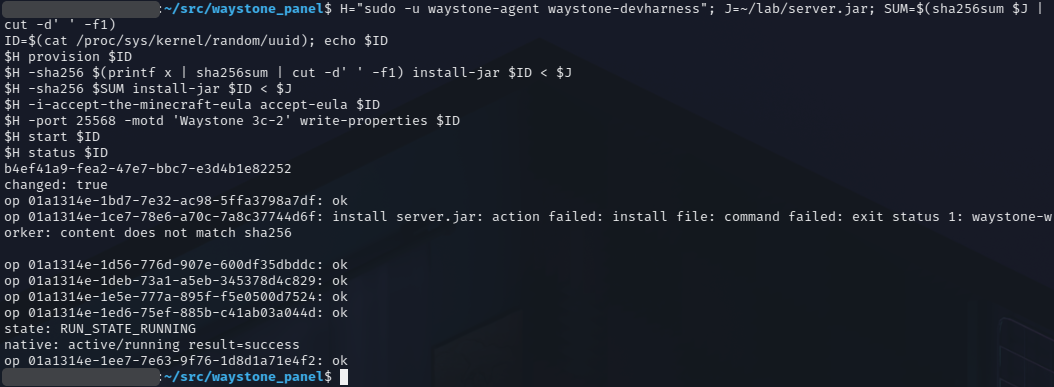
For the screenshot I ran the whole sequence a second time on another new server, pasted into a terminal in one go. That's why it shows port 25568 where the first run used 25567. The top half is the commands and the bottom half is the output, in the same order.
- Setup: the first lines store the jar's SHA-256 and generate a fresh server ID. That's the
b4ef41a9…line. - Provision:
changed: true. The server's account, folder and unit now exist. - Install with the wrong hash: the command hashes the letter
xand sends that in place of the jar's real hash. The worker copies the jar, sees the bytes don't match, and refuses:content does not match sha256. Nothing is installed. - Install with the right hash:
ok. Note the< $Jat the end of both install commands. My shell opens the jar and the tool receives the open file. No path is sent. - Accept the EULA, with its deliberately long flag, then write the properties. This run sets port 25568 and the MOTD "Waystone 3c-2". Both report
ok. - Start, then status:
RUN_STATE_RUNNING, and systemd agrees withactive/running result=success.
Every line that starts with op is one operation and its ID, the same ID you'd find in the service's log. Seven requests went out and six succeeded. The one that failed is the one that was supposed to.
What's still missing
- No downloads yet. You hand Waystone the jar and its hash.
- No controller or web UI yet. Everything here runs through the development tool.
- Installing over a running server isn't blocked yet.
- A few small follow-ups from review, such as making sure a malformed message can never leave a received file open.
Next
That completes Stage 3. The agent and its helpers can now build, install, configure, start and stop a game server, with no root in the agent and no manual work on the machine.
Stage 4 puts the controller in front of all of this. Requests go to the controller, every action is recorded as an operation in PostgreSQL before anything happens on a machine, and the controller tells the agent what to do.
Waystone is open source under AGPL-3.0.